ros tfs: what are they? why use them?
The TF package in ROS is incredibly useful for handling coordinate transformations. It simplifies managing coordinate frames and allows for a clear representation of transforms between them in robotics applications. I used TFs extensively in my work in the Summer of 2023 with the University of Minnesota's Robotics Perception and Manipulation Laboratory (RPM Lab) under Prof. Karthik Desingh. Working with the Boston Dynamics Spot robot quadruped (Figure 1), I used a system with multiple cameras and actuators and control it completely from the ground-up. TFs were crucial in this process, as they allowed me to keep track of the robot's position and orientation in the world frame.
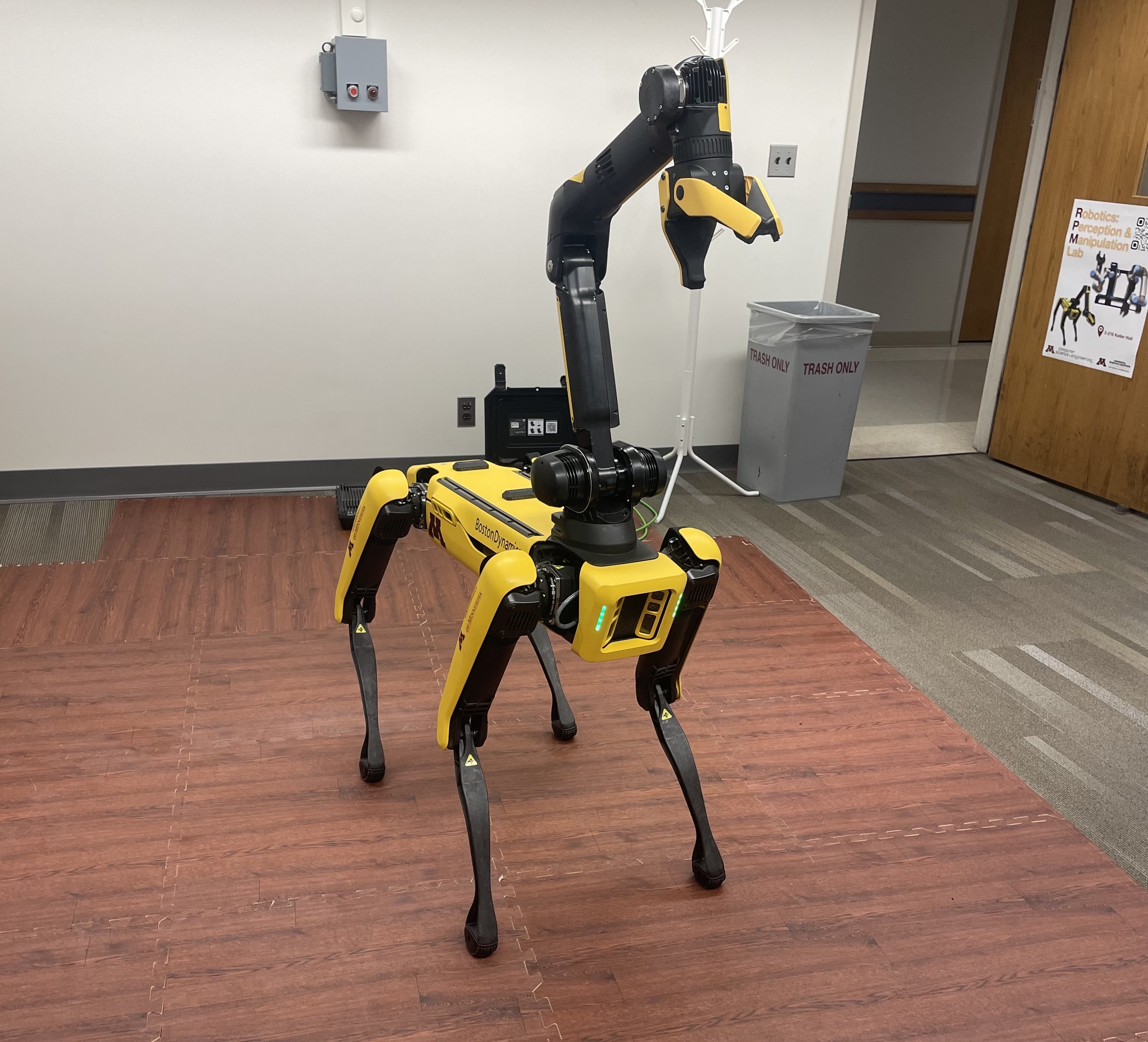
/tf topic(s) representing the transform between the robot and the world frame through GPS and IMU data.What are TFs?
TFs (Transforms) allow robots to keep track of multiple coordinate frames over time. You would be able to answer questions like:
- Where is the camera frame relative to the robot base?
- How is the end-effector of a robotic arm positioned in the world frame?
- Where was the head frame relative to the world frame, T seconds ago?
Fun Fact: TFs are named TFs partially due to the developer who made them—Tully Foote.
Why Use TFs?
TFs make handling complex systems much easier by:
- Standardizing coordinate transformations
- Allowing queries about frame relationships at any time
- Reducing manual calculations of transforms
Getting Started with TFs
The ROS website has tutorials to understand how exactly they work. Here I'll highlight the essence of TFs to understand how they are useful while working with robots.
Transforms of any sort are required when working with robots of multiple components. Defining a transform between two different links and using it to transform data from one link to another is a common practice in robotics. TFs in ROS provide this functionality in a very easy-to-use manner, which is evident in robots with more than just a couple links or sensors.
The tf package has been deprecated and the move has been made to the tf2_ros package. tf2 has been the successor to tf and is widely used in ROS2 to represent transforms. Packages like tf2_geometry_msgs and tf2_py are used along with tf2 to represent transforms in ROS2.
More links to get started with TFs:
- ROS Tutorials: Introduction to tf2 — includes instructions to run a simple
turtle_tf2demo - More ROS
tf2tutorials - ROS2 Industrial Workshop Docs for
tf2 - Articulated Robotics article and demo on
tf2
Representing Data in TFs
TFs are represented as TransformStamped messages in ROS. These messages contain the following fields:
std_msgs/Header header
string child_frame_id
Transform transform
One of the coolest things about tf2 is the Buffer. The Buffer is a class that stores all the transforms in a tree structure. It can be used to query transforms between different frames. It's a powerful tool that can be used to store all the transforms in a system and query them at any time. Functions like lookup_transform and all_frames_as_yaml are used to query transforms and print all frames in the buffer, respectively. set_transform is used to add a transform to the buffer.
How I used TFs
Here's a piece of code I wrote when working in RPM Lab to get data from Spot. The public Gist is available here. I wrote a _dummy_test() function to test my TF2 Buffer as well.
### import modules ###

# dataset containing rosbag
from rosbag2dataset import dataset

import rospy

# import tf2_geometry_msgs
from geometry_msgs.msg import TransformStamped
from geometry_msgs.msg import Quaternion as q
from tf2_ros import TransformException
from tf2_ros import Buffer
# import tf2_msgs
import tf2_py as tf2
import sys

##### helper functions #####

def _transfer_to_ref_frame(tf_buffer, topics, topic_ref='body'):
    '''
    Transforms set topics on tf_buffer to reference topic and returns an updated buffer.
    Args:
        tf_buffer (Buffer): tf2 buffer containing all transforms
        topics (list): list of topics to get transforms from
        topic_ref (str): reference topic to get transforms to
            default: 'body'
    Returns:
        tf_buffer_updated (Buffer): updated tf2 buffer containing all transforms to reference topic
    '''

    # using an updated tf_buffer to store transforms to reference frame
    tf_buffer_updated = tf_buffer

    # getting all transforms to reference frame
    for topic in topics:
        try:
            # getting transform from topic to reference topic
            transform = tf_buffer.lookup_transform(topic_ref, topic, rospy.Time())

            # adding transform to updated buffer
            tf_buffer_updated.set_transform(transform, transform.header.frame_id)
            print("------------------------")
            print("pose from " + topic + " to " + topic_ref)
            print("------------------------")
            print(transform)

        except tf2.LookupException as e:
            print("There either is an invalid quaternion or a frame is not found.")
            print(e)

    return tf_buffer_updated

def _dummy_test(tf_buffer, val1=[1, 1, 1, 0, 0, 0, 1],
                                   val2=[0, 2, 1, 0, 0, 0, 1], val3=[0, 0, 0, 0, 0, 0, 1]):
    '''
    Creates dummy TransformStamped messages to be sent into buffer and displayed.
    Args:
        val1 (list): list of pose values for dummy header w.r.t. dummy child
            default: [1, 1, 1, 0, 0, 0, 1]
        val2 (list): list of pose values for dummy leaf1 w.r.t. dummy child
            default: [0, 2, 1, 0, 0, 0, 1]
        val3 (list): list of pose values for dummy leaf2 w.r.t. dummy child
            default: [0, 0, 0, 0, 0, 0, 1]
    '''

    # creating dummy pose1
    pose1 = TransformStamped()
    pose1.header.frame_id = 'dummy_header'
    pose1.header.stamp = rospy.Time()
    pose1.child_frame_id = 'dummy_child' # dummy child is a child for dummy header
    pose1.transform.translation.x, pose1.transform.translation.y, pose1.transform.translation.z = val1[0:3]
    quat = q(val1[3], val1[4], val1[5], val1[6])
    # quat = q.normalize(quat)
    pose1.transform.rotation.x, pose1.transform.rotation.y, pose1.transform.rotation.z, pose1.transform.rotation.w = quat.x, quat.y, quat.z, quat.w

    # creating dummy pose2
    pose2 = TransformStamped()
    pose2.header.frame_id = 'dummy_child'
    pose2.header.stamp = rospy.Time()
    pose2.child_frame_id = 'dummy_leaf1' # dummy leaf1 is a child for dummy child
    pose2.transform.translation.x, pose2.transform.translation.y, pose2.transform.translation.z = val2[0:3]
    quat2 = q(val2[3], val2[4], val2[5], val2[6])
    # quat2 = q.normalize(quat2)
    pose2.transform.rotation.x, pose2.transform.rotation.y, pose2.transform.rotation.z, pose2.transform.rotation.w = quat2.x, quat2.y, quat2.z, quat2.w

    # creating dummy pose3
    pose3 = TransformStamped()
    pose3.header.frame_id = 'dummy_child'
    pose3.header.stamp = rospy.Time()
    pose3.child_frame_id = 'dummy_leaf2' # dummy leaf2 is a child for dummy child
    pose3.transform.translation.x, pose3.transform.translation.y, pose3.transform.translation.z = val3[0:3]
    quat3 = q(val3[3], val3[4], val3[5], val3[6])
    # quat3 = q.normalize(quat3)
    pose3.transform.rotation.x, pose3.transform.rotation.y, pose3.transform.rotation.z, pose3.transform.rotation.w = quat3.x, quat3.y, quat3.z, quat3.w

    # adding dummy poses to buffer
    tf_buffer.set_transform(pose1, pose1.header.frame_id)
    tf_buffer.set_transform(pose3, pose3.header.frame_id)
    tf_buffer.set_transform(pose2, pose2.header.frame_id)

    try:
        # printing the two leaves' relation to dummy_child
        print("------------------------")
        print("pose from leaf1 to child")
        print("------------------------")
        print(tf_buffer.lookup_transform("dummy_leaf1", "dummy_child", rospy.Time()))
        print("------------------------")
        print("pose from leaf2 to child")
        print("------------------------")
        print(tf_buffer.lookup_transform("dummy_leaf2", "dummy_child", rospy.Time()))

        # printing one of the two leaves' relation to dummy_header
        print("------------------------")
        print("pose from leaf1 to header")
        print(tf_buffer.lookup_transform("dummy_header", "dummy_leaf1", rospy.Time()))
        print("------------------------")

    except tf2.LookupException as e:
        print("There either is an invalid quaternion or a frame is not found.")
        print(e)

    return

##### main function #####

def main():

    # input arguments for topics to get relative transforms from
    topic_ref = sys.argv[1] # --ref == reference topic
    if topic_ref not in ['--ref', '-r']:
        topics = sys.argv[1:]
        topic_ref = 'body'
    else:
        topic_ref = sys.argv[2]
        topics = sys.argv[3:]

    # getting topics from dataset
    # type of static data: TransformStamped
    tf_static_data = list(dict(dataset[0])['tf_static'].transforms)

    #odom_data = dict(dataset[0])['odom']
    # print(odom_data)

    # tf2 buffers usually have a try and except framework,
    # checking for TransformException
    try:

        # creating tf2 buffer
        tf_buffer = Buffer()

        # dummy_test (comment out when actual dataset is used)
        # _dummy_test(tf_buffer)

        # adding static transforms to buffer
        for static_indiv in tf_static_data:
            tf_buffer.set_transform(static_indiv, static_indiv.header.frame_id)
            # print(tf_buffer.lookup_transform(static_indiv.header.frame_id, static_indiv.child_frame_id, rospy.Time()))

        # printing all frames in buffer
        # print(tf_buffer.all_frames_as_yaml())

        # getting all transforms to reference frame
        tf_buffer_updated = _transfer_to_ref_frame(tf_buffer, topics, topic_ref)

        # printing all frames in updated buffer
        # print(tf_buffer_updated.all_frames_as_yaml())

    except TransformException as e:
        # printing error type and error
        print(type(e))
        print(e)


if __name__ == '__main__':
    main()
Some other useful things from tf2:
tf2_rosprovides aTransformListenerclass that can be used to listen to transforms from atf2buffer.tf2_geometry_msgsprovides functions to convert betweentf2andgeometry_msgsmessages.- Exceptions like
TransformExceptionandLookupExceptioncan be used with thetf2package to handle errors in transforms. tf2_rosalso provides aBufferClientclass that can be used to connect to atf2buffer server and get transforms from it.
There are so many more useful things that can be done with tf2 and I hope this post gives you a good idea of what they are and how they can be used. tf2 is a foundation for many robotics projects and is a great tool to have in your toolbox.
The greatest tool for picking up any ROS package is the ROS Wiki and the official ROS website itself.